
What is GravelPlex?
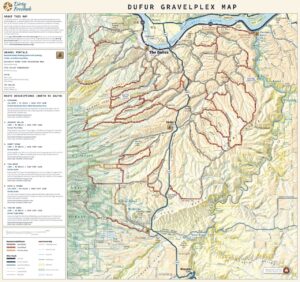 GravelPlex is a new type of digital map developed by Dirty Freehub that will be available on the Avenza platform. It’s designed specifically for gravel cyclists who want to explore roads with low vehicle traffic and mixed surfaces—paved, gravel, and primitive dirt roads. Unlike mountain bike trail maps, which focus on singletrack routes, GravelPlex focuses on linking quiet, scenic backroads to help riders build custom routes that suit their desired length and difficulty.
How It’s Different from TrailForks
You can think of GravelPlex as serving a similar purpose—but for gravel riding instead of mountain biking. TrailForks catalogs trails within a specific network, such as the Phil’s system near Bend, Oregon. Each trail is rated for its technical difficulty.
GravelPlex, by contrast, maps out roads—not trails—within a larger region. For example, the Dufur GravelPlex map covers the entire area bounded by The Dalles, Dufur, Tygh Valley, Maupin, and the Deschutes River to the east, about 30 miles by 35 miles. Within that region are hundreds of rideable roads, and the GravelPlex map helps riders find and connect them safely.
Instead of showing trail difficulty, GravelPlex shows road surface type to indicate technical challenge:
Paved roads = easier, smoother riding
Gravel roads = moderate difficulty
Primitive roads = more challenging, rougher terrain
How the Map Works
The base GravelPlex map is a product we paid to have professionally built, and Dirty Freehub will maintain it. It provides the foundation of accurate, up-to-date road data and surface classifications.
Riders can then customize the map by adding Dirty Freehub route layers. Each route layer is a GPX file that overlays an existing Dirty Freehub route onto the base GravelPlex map. By combining these layers, riders can visualize how official routes connect to nearby roads and plan rides that meet their needs.
Why Layers Matter
Layers make the map interactive and personal. They let riders build their own routes using the roads and terrain that appeals to them.
- Creating shorter routes: Suppose you add the Japanese Hollow route as a layer. You can see where it intersects other low-traffic roads, making it easy to shorten the ride while staying on safe and scenic terrain. Many riders want this flexibility—shorter versions of existing routes without losing the adventure.
- Creating longer routes: You can also combine several Dirty Freehub routes in one area using connectors from the GravelPlex map to design a longer, multi-segment ride that suits your endurance level.
The Big Picture
The GravelPlex map and its layer system form a powerful toolkit for route-building for gravel cyclists. Rather than following a single predefined route, riders can mix and match segments, explore safely, and adapt rides to their time, skill, and curiosity.
In essence, GravelPlex + Layers is all about customization and exploration—helping every rider craft their ideal adventure on the backroads.
How Riders Can Use the GravelPlex Map
Riders can use the GravelPlex map in several ways—both while exploring on the bike and when planning routes in advance.
- As a Standalone Navigation Tool
Some riders will use GravelPlex on its own, directly within the Avenza app, as a real-time exploration map. These are the pure explorers—riders who enjoy discovering quiet backroads and connecting their own routes on the fly. The map helps them see road types and traffic levels so they can make safe, confident decisions mid-ride. - Alongside a Dirty Freehub Route
Other riders will pair a Dirty Freehub route (loaded onto their bike computer) with the GravelPlex map (loaded in Avenza and overlaid with the matching Dirty Freehub route layer). This combination lets riders adjust a route while riding—for example, shortening a ride if they’re getting tired or extending it if they’re feeling strong. Some riders may have multiple Dirty Freehub route layers available for an area—say, six in total—but choose to display only one or two at a time, keeping the others hidden until needed. - As a Route-Building and Planning Tool
GravelPlex also shines during the planning stage of a ride. On a computer, a rider can use the map to study the terrain and identify low-traffic, scenic roads that fit their skill level and interest. They can then use platforms like Ride with GPS or Strava to create their own custom route, informed by GravelPlex’s detailed surface and traffic information.

 Behind every route is scouting, mapping, storytelling, and a whole lot of pedal power.